Create storyboards and video drafts for YouTube Shorts

Turn a story or short prompt into four 16:9 landscape or 9:16 portrait storyboard frames, check the visual direction, and continue to a matching Seedance 2.0 video draft.

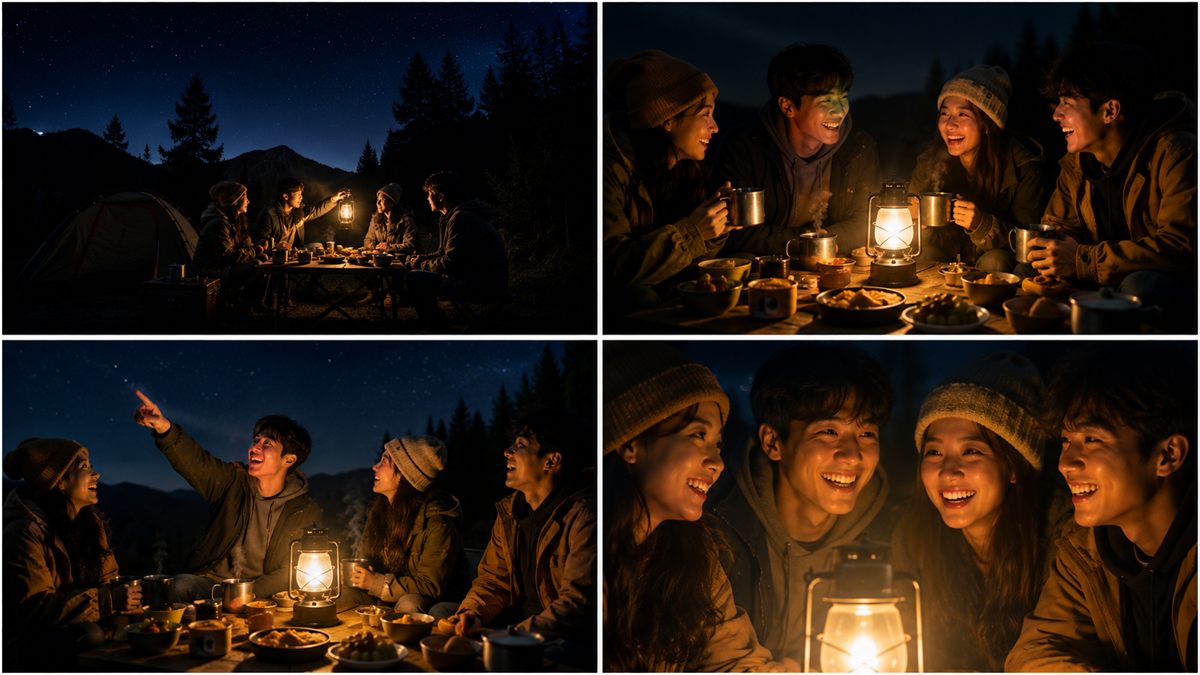
Four-panel generated storyboard of friends sharing a late meal around a lantern at a mountain campsite

Product example: a campsite reveal

Product example generated with Storyboard2Video. It demonstrates the storyboard stage and is not a customer case study.

Check the sequence before you spend credits on motion

A short-video idea can feel clear in writing while the actual shot order remains vague. Going straight to video makes composition and pacing harder to inspect.

A four-panel board creates a review point between the idea and motion. You can see whether the opening, transition, reveal, and final image belong in one sequence.

From short idea to reviewable video draft

The storyboard is a deliberate checkpoint, not a decorative by-product of video generation.

  1. Start with a short-form idea

    Enter the story, scene idea, or concise prompt that should become a short visual sequence.

  2. Generate four storyboard panels

    ChatGPT Image 2 creates four frames in the selected format: a 2x2 sheet for 16:9 landscape or a horizontal contact sheet for 9:16 portrait.

  3. Review the visual direction

    Inspect subject continuity, shot order, composition, and mood before moving to video.

  4. Create a video draft

    Choose the model, duration, resolution, and audio options currently available in the generator.

Product example: a campsite reveal

Goal
Shape a short social story into an opening, development, reveal, and closing image before generating motion.
Example input
At a mountain campsite at night, four friends share a late meal around a lantern, notice something in the sky, and end together in a warm close shot.
Process
This example uses four 16:9 panels. Creators can also choose 9:16 portrait frames before checking subject continuity, shot order, and mood.
Output
The displayed output is a generated 2x2 storyboard sheet. After review, that board can be used as the visual reference for a Seedance 2.0 video draft.
Best for
Short narrative concepts, YouTube Shorts, social video openings, and visual drafts where four clear beats are enough to test the direction.
Current limit
The example does not represent a complete edit, platform-ready upload, captions, or channel analytics.

Short-form tasks that fit

The workflow is most useful when a short idea benefits from a visible sequence before motion generation.

  • Short video concepts with four distinct visual beats
  • YouTube Shorts ideas that need an opening and payoff
  • Social video openings and visual hooks
  • Early visual drafts for a pitch or production handoff

What creators can use today

These are current product capabilities visible in the generator, not projected features.

  • Generation history keeps storyboard and video tasks available for later review.
  • Storyboard and video previews let you inspect results before downloading them.
  • Generated storyboard images and video drafts include download actions.
  • The generator shows an estimated credit cost before each generation starts.

Where this workflow stops

Use the workflow for concepting and drafts, then finish publishing and editing in the tools built for those jobs.

  • Storyboard2Video is not a full long-form timeline editor.
  • It does not publish videos to YouTube, TikTok, Reels, or other platforms.
  • It does not provide channel analytics, retention analysis, or content scheduling.
  • Available model, duration, resolution, and audio choices are the options shown in the generator.

Give the next short video a visual plan.

Start with a short-form idea, inspect the four-panel storyboard, and decide when it is ready for a video draft.